
Vous n'êtes pas identifié(e).
Pages 1
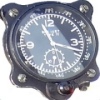
En Early Access chez Blackbird Simulations
L'oiseau paraît déjà bien avancé.
Fan de cet avion à la technologie incroyable cela fait longtemps que je l'attendais sur FS 2024 
Dernière modification par Altamira (28/12/2025 22:26)
-- Gigabyte B650 Eagle AX-- AMD Ryzen 7-9700X -- 32 Go Ram Crucial DDR5 6000 Mhz -- SSD Crucial 480Go -- SSD PNY 1To--Seagate Firecuda 2To- Maxtor 1To-- Win 11 64 Pro -- Zotac Gaming GeForce RTX 4070 Twin Edge 12 Go -- BenQ 35" LED - XR3501 Curved -- Thrustmaster Warthog -- Saitek RudderProfight -- TrackIR5 -- Casque Meta Quest 3 --
Hors ligne
Je le commade de suite
Dernière modification par Altamira (28/12/2025 22:28)
-- Gigabyte B650 Eagle AX-- AMD Ryzen 7-9700X -- 32 Go Ram Crucial DDR5 6000 Mhz -- SSD Crucial 480Go -- SSD PNY 1To--Seagate Firecuda 2To- Maxtor 1To-- Win 11 64 Pro -- Zotac Gaming GeForce RTX 4070 Twin Edge 12 Go -- BenQ 35" LED - XR3501 Curved -- Thrustmaster Warthog -- Saitek RudderProfight -- TrackIR5 -- Casque Meta Quest 3 --
Hors ligne
Nouvelle update pour cette version beta en Early Access
C'est un vrai plaisir de voler là dessus... Surtout parce que c'est pas facile , mais décoller de Mildenhall pour remonter la côte norvégienne à pleine balle à plus de Mach 3 pour ensuite aller zieuter du côté de Mourmansk...
Encore des améliorations
We are waiting for our new certification to come through but thought you would prefer to get this update sooner, rather than wait.
What does certification mean?
Certification means that Windows will run the installer without a user account control popup asking you if you trust this software.
Rest assured this installer is completely non-toxic, and you are safe to let it run.
What’s new
1. This release has some new and improved cockpit sounds as part of the ongoing improvements in the sound systems. More will appear in 0.9.0.
What’s Fixed
1. Autopilot waypoint sequencing in the ANS AP has been improved to
address the issues with waypoints not being detected.
2. Liveries fixed due to SU5 changes.
3. Start cart driveshafts animated and a short delay is introduced before the carts are hidden.
4. Fixed missing NWS template.
5. Adjusted coloring on front pitot tubes.
6. Fixed floating “no step” decal and detached decal on the back of batwings.
7. 11328: Engines can’t be restarted in flight.
8. 11252: Landing light doesn’t turn off when gear is retracted.
9. 11271: Refuel door sometimes causes a crash.
10. 11323: Shutting off left engine causes right to fail. (see note below)
11. 11320: Right Emergency Shutoff Switch reversed tooltip.
12. 11281: Throttle Controls.
13. 11253: Moving throttle to off accelerates aircraft. (see note below)
14. 11313: Right restart tooltip incorrect.
15. 11269: Walt’s Wheel incorrectly labelled.
16. 11214: APW (Pusher/Shaker) switch not checked for BIT test.
17. 11254: Front inlet bypass door indications reversed.
18. 11275: Forward bypass door indicator.
19. 11290: Forward fuel transfer switch.
20. 11282: Fuel Pump Lights.
21. 11202: Forward bypass open when spawned on ramp before engine start.
Important notes: When an engine fails for any reason, or if the BUS TIE open caution appears, you must press the BUS TIE button on the electrical panel to ensure that all electrical buses remain powered. Further failures can result if you don’t do this.
Always move the SR-71 throttle slowly when making any adjustments, including during takeoff and landing. Rapid movement of the throttles can result in undesirable effects.
Known Problems
1. Autopilot ANS mode work is ongoing. The ANS Autopilot is a completely custom system designed to address some of the issues trying to use the default MSFS AP at high altitudes and speeds.
2. On the “map projector” when you have a flight plan loaded the course line drawn on the map skips some waypoints, making it appear you are off course. Check the EFB or the GNS 430 (if you have it displayed), which displays it properly.
3. The “Auto-Temp” switch on the environmental section of the panel is an oddball switch and isn’t implemented yet. By default, the SR will act as if it’s in the default “Auto” mode.
4. In GPS mode, you have to be on an intercept course for the flight plan route before the Auto Nav will engage.
5. There are a number of multiplayer issues we’re aware of.
6. The LODs are not yet set in their final state and might not be until the model is finalized, but improvements will be ongoing.
7. The checklists used by Brian and Walt don’t match the official SR-71
checklists. These were their own checklists they used in real life. The
important items are all there but often in a different order and sometimes the two use their own shorthand terms.
8. Circuit breakers are not implemented yet.
-- Gigabyte B650 Eagle AX-- AMD Ryzen 7-9700X -- 32 Go Ram Crucial DDR5 6000 Mhz -- SSD Crucial 480Go -- SSD PNY 1To--Seagate Firecuda 2To- Maxtor 1To-- Win 11 64 Pro -- Zotac Gaming GeForce RTX 4070 Twin Edge 12 Go -- BenQ 35" LED - XR3501 Curved -- Thrustmaster Warthog -- Saitek RudderProfight -- TrackIR5 -- Casque Meta Quest 3 --
Hors ligne
Merci pour toutes ces infos !
MSFS 2020 Premium D, MSFS 2024 Aviator, X-Plane 12 - Windows 11
Hors ligne
Pages 1